













Stop Spending Weeks on Videos You Could Make in Minutes!
Imagine making a polished, professional video in under five minutes. No camera, no crew, no editing software. That’s not science fiction anymore; it’s the everyday reality, thanks to these best AI video generators.
In 2026, everyone from solo creators to giant brands cuts time and costs, thanks to tools that handle the heavy lifting.
Video dominates every platform: YouTube, Instagram, LinkedIn, TikTok. Everywhere you look, it’s video first. But turning ideas into videos usually means burning through hours (and dollars).
Writers trying to turn blog posts into engaging clips, marketers launching campaign after campaign, small business owners struggling without a media team, it’s always felt like you need a studio just to keep up.
That barrier? It’s crumbling. This guide is here to help. I’ve tested the top 25 best AI video generators available right now, covering everything from free tools to enterprise monsters. Skip the guesswork. Find exactly the right option for you.
Let’s get started.

Table of Contents
Why AI Video Generation Is the Biggest Shift This Decade
Before we jump into the list, you should know what’s really changing here.
Video consumption keeps exploding. By 2026, over 82% of all internet traffic will be video. But production just hasn’t kept up until AI flipped everything on its head.
Here’s what you can do with a solid AI video tool today:
- Type a script or paste your blog post, and the AI assembles video footage, captions, and exports it, ready to publish.
- Realistic avatars speak your script in any language, no need to show your face.
- Automatic edits AI cleans up pauses, adds subtitles, balances audio, and tweaks color.
- Free tools now deliver features that cost money just a couple of years back.
- Make a single video and get it exported in 40 languages in minutes.
This means anyone with zero budget and just a laptop can go toe-to-toe with brands spending thousands. Pick the right tool, and you level the playing field.
If you’re curious about how AI is reshaping digital marketing, check out our related guide on AI tools for content creation in 2026. It’s a great companion to this article.

The 25 Best AI Video Generators in 2026 Full Breakdown
We reviewed every tool for video quality, ease of use, pricing, standout features, and the best use case. Whether you need something basic and free or full-powered for a team, everything you need is right here.
1. Runway ML (Gen-4) — Hollywood-Quality AI Studio
- Best For: Filmmakers, agencies, ad creators
- Pricing: Free plan; Pro starts at $15/month
- Pros: Ultra-realistic output, advanced motion controls, text/image/video input, supports 4K exports
- Cons: Steep learning curve, free credits burn quickly
- Bottom Line: If quality is your top priority, Runway leads the pack.
2. OpenAI Sora — Cinematic Text-to-Video
- Best For: Creatives, storytellers, filmmakers
- Pricing: Included with ChatGPT Pro ($20/month), API options
- Pros: Stunning long-form video, consistent scenes, handles complex stories and physics
- Cons: Limited access in some areas, less granular editing
- Bottom Line: Sora rewrites what text-to-video can achieve. If you’re a storyteller, this is your jackpot.
3. Synthesia — Leading AI Avatar Video Platform
- Best For: Training, HR, e-learning
- Pricing: Starts at $29/month
- Pros: 130+ avatars, multilingual (140+), custom avatar creation, easy slide-video conversion
- Cons: Not for cinematic content, avatars sometimes feel robotic
- Bottom Line: Synthesia rules the corporate video space, especially for training or explainers.
4. Pictory AI — Instantly Turn Articles Into Videos
- Best For: Bloggers, content marketers, SEO pros
- Pricing: Starts at $19/month
- Pros: Paste URL/script, get video fast, automatic sentence highlighting, big stock library
- Cons: Limited visual customization, stock footage can feel generic
- Bottom Line: Pictory lets marketers turn blog posts into videos without ever touching a timeline editor.

5. InVideo AI — All-in-One AI Video Generator
- Best For: Social content creators, marketers, small businesses
- Pricing: Free plan; paid from $30/month
- Pros: 5000+ templates, AI script/voiceover, direct publishing, team collaboration
- Cons: Watermark on free plan, videos can feel template-heavy
- Bottom Line: InVideo AI is a beginner’s must-have, starting free, scaling up easily.
6. HeyGen — Human-Looking AI Avatars
- Best For: Sales, education, brand reps
- Pricing: Free (1 min/month), Pro from $29/month
- Pros: Hyper-real avatars, translations in 40+ languages, brand customization
- Cons: Pricey for big users, occasional voice glitches
- Bottom Line: HeyGen is essential for faceless, avatar-driven YouTube channels at scale.
7. Pika Labs — Fast, Creative AI Video Generator
- Best For: Social creators, meme-makers, artists
- Pricing: Free beta; paid from $8/month
- Pros: Quick 3-second clips, unique animation styles, speedy rendering, lively Discord community
- Cons: Short clips only, less suited for longer content
- Bottom Line: Snappy, creative, and addictively easy, Pika’s perfect for short-form social video.
8. Google Veo 2 — Google’s Cinematic AI Machine
- Best For: Enterprise, creative studios, researchers
- Pricing: Google DeepMind/Vertex AI (custom pricing)
- Pros: Photoreal motion, command-driven cinematics, Google Cloud integration
- Cons: Not fully public, pricey for enterprise
- Bottom Line: Google’s Veo 2 is a heavyweight; the competition is intense, and Google’s in the mix.
9. Kling AI — China’s Powerhouse Goes Global
- Best For: Creators, artists, advertisers
- Pricing: Free plan, Pro from $10/month
- Pros: 5s–2m videos, great photoreal output, solid physics engine, affordable
- Cons: Tricky interface for English speakers, slower rendering during peaks
- Bottom Line: Kling AI is impressive, especially at its price, one of the most underrated, hands-down.
10. Lumen5 — AI for Busy Marketers
- Best For: Marketing teams, social managers, B2B
- Pricing: Free plan; Business from $79/month
- Pros: Blog-to-video fast, smart scene selection, branding options, easy for non-designers
- Cons: Heavy watermarks on the free plan, limited animation
- Bottom Line: Reliable and scalable for marketers pushing out content on YouTube or LinkedIn.
11. Descript — Edit Video Like Text
- Best For: Podcasters, YouTubers, educators
- Pricing: Free; Creator from $24/month
- Pros: Overdub voice cloning, automatic transcriptions, screen-record/video edit, collaborative
- Cons: Voice cloning varies, slower rendering
- Bottom Line: Descript makes editing accessible, especially for folks used to writing or podcasting.
12. Fliki — Text-to-Video With Natural Voiceovers
- Best For: Faceless YouTube, creators, educators
- Pricing: Free (5 min/mo); Standard from $28/month
- Pros: 900+ AI voices, 75+ languages, built-in media library, fast script-to-video
- Cons: Limited animation, best voices require upgrade
- Bottom Line: If you need pro-quality voiceover without hiring anyone, Fliki’s a hidden gem.
13. Steve.ai — Animated Video For Any Niche
- Best For: Animated explainers, e-learning
- Pricing: Basic from $20/month
- Pros: Live and animated options, API for devs, quick turnaround, custom branding
- Cons: Animation quality is basic, interface looks old
- Bottom Line: Steve.ai shines for fast animated explainers.
14. Colossyan — L&D and Corporate Video
- Best For: HR, learning, enterprise
- Pricing: Starter from $28/month
- Pros: Realistic avatars, multi-scene editor, SCORM export, multilingual
- Cons: Niche, fewer avatars than competitors
- Bottom Line: Built for corporate learning, Colossyan’s a specialist in the enterprise world.
15. DeepBrain AI — Newsroom-Ready AI Video
- Best For: News, enterprise comms, broadcasters
- Pricing: Starter from $29/month
- Pros: Realistic news avatars, fast script-to-video, multilingual, custom backgrounds
- Cons: Best for news formats, pricey for casual use
- Bottom Line: Want polished, broadcast-level avatar videos? DeepBrain is your best bet.

16. Veed.io — AI Editing Suite For Creators
- Best For: Creators, influencers, YouTubers
- Pricing: Free; Pro from $25/month
- Pros: Auto captions, AI background removal, eye contact correction, team features
- Cons: Advanced AI is paid-only, slow render on big projects
- Bottom Line: Accessible yet powerful, perfect if you want to grow into more advanced features later.
17. Wisecut — Automated Editing for Long Videos
- Best For: YouTubers, vloggers, interviews
- Pricing: Free; Professional from $29/month
- Pros: Cuts silences/filler, smart background sync, facial recognition edits, auto subtitles
- Cons: Best with talking heads, less useful for animation/scripted
- Bottom Line: Wisecut is a real time saver for anyone dealing with hours of raw footage.
18. Animoto — Drag-and-Drop AI Video
- Best For: Real estate, events, small business
- Pricing: Free plan; Professional from $15/month
- Pros: Simple drag-drop, big music library, branded templates
- Cons: Limited control, not for complex projects
- Bottom Line: Animoto keeps things easy, perfect for quick promo videos.
19. Kaiber — Artistic Video Generator
- Best For: Musicians, artists, NFT creators
- Pricing: Explorer from $5/month
- Pros: Artistic styles, music-driven visualization, and style transforms
- Cons: Very niche, short clips only
- Bottom Line: Kaiber is tailor-made for creators wanting expressive, visual video.

20. Elai.io — Mass Personalization
- Best For: Sales, outreach, custom marketing
- Pricing: Free (1 video), Basic from $29/month
- Pros: Personalized videos from spreadsheets, custom avatars, CRM integration
- Cons: Pricey, setup is complex
- Bottom Line: Perfect for sales teams that need personalized outreach at scale.
21. Adobe Firefly Video — AI Video for Pros
- Best For: Adobe users, designers
- Pricing: Included in Creative Cloud ($54.99/mo)
- Pros: Seamless Premiere integration, generative features, top-notch text-to-video, and Adobe licensing
- Cons: Pricey on its own, requires Adobe familiarity
- Bottom Line: If you’re already using Adobe, Firefly saves a ton of time.
22. Haiper — Fastest New AI Video Generator Tool
- Best For: Fast prototyping, social content, creative ideas
- Pricing: Free beta; Pro coming soon
- Pros: Ultra-fast generation, quality motion, image input, easy prompts
- Cons: Still beta, not for long videos yet
- Bottom Line: Haiper is new, exciting, and super-fast. Worth keeping an eye on.
23. Stable Video Diffusion (Stability AI) — Open-Source Power
- Best For: Developers, researchers, open-source fans
- Pricing: Free (self-hosted), API applies
- Pros: Customizable, huge dev community, no vendor lock, perfect for custom datasets
- Cons: Technical setup needed, less polished UI
- Bottom Line: Developers love it for full control, no licensing headaches.
24. Vrew — Script-First Editing
- Best For: Educators, docs, interviews
- Pricing: Free; Standard from $9.99/month
- Pros: AI script match, built-in voice/subtitles, easy interface, cheap
- Cons: Small stock library, limited animation
- Bottom Line: Powerful yet simple, great for serious creators and beginners alike.
25. Kapwing — Collaborative Video Workspace
- Best For: Teams, agencies, educators
- Pricing: Free; Pro from $22/month
- Pros: Real-time teamwork, AI subtitles, meme/social templates, major formats
- Cons: Free plan limits file size, less advanced AI
- Bottom Line: Perfect for teams, easy to create, review, and publish together.
How To Pick Your Best AI Video Generator
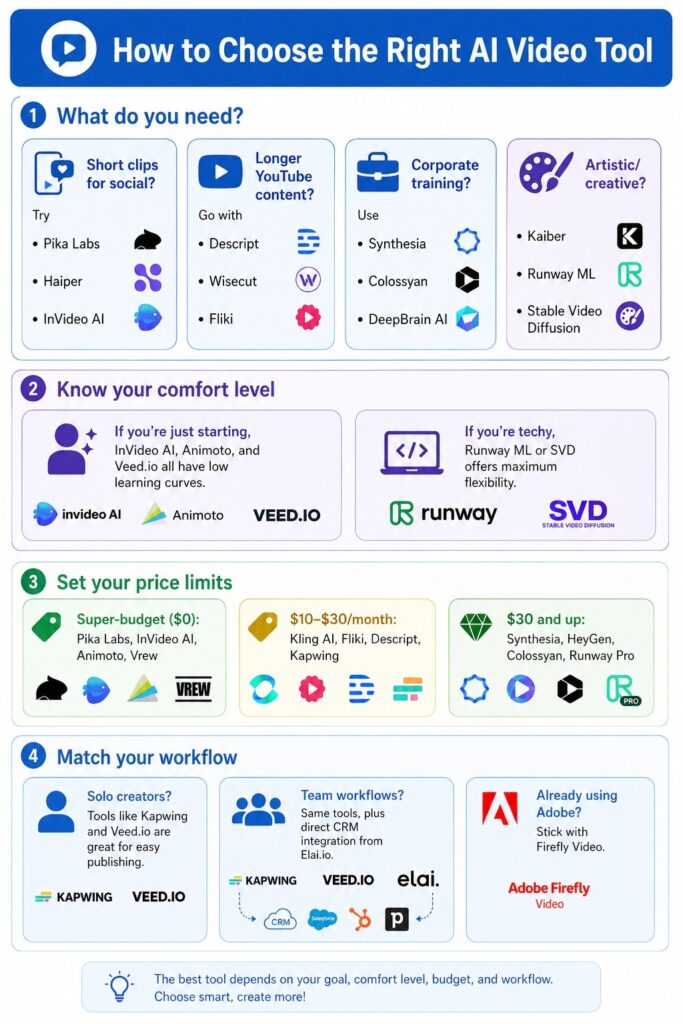
With all these options, choice paralysis is real. Here’s how to focus:
1. What do you need?
- Short clips for social? Try Pika Labs, Haiper, and InVideo AI.
- Longer YouTube content? Go with Descript, Wisecut, or Fliki.
- Corporate training? Use Synthesia, Colossyan, and DeepBrain AI.
- Artistic/creative? Kaiber, Runway ML, Stable Video Diffusion.
2. Know your comfort level
If you’re just starting, InVideo AI, Animoto, and Veed.io all have low learning curves. If you’re techy, Runway ML or SVD offers maximum flexibility.
3. Set your price limits
- Super-budget ($0): Pika Labs, InVideo AI, Animoto, Vrew
- $10–$30/month: Kling AI, Fliki, Descript, Kapwing
- $30 and up: Synthesia, HeyGen, Colossyan, Runway Pro
4. Match your workflow
- Solo creators?
Tools like Kapwing and Veed.io are great for easy publishing.
- Team workflows?
Same tools, plus direct CRM integration from Elai.io.
- Already using Adobe?
Stick with Firefly Video.
Pro Tips For Great AI Videos
You need to feed the machine quality input.
Here’s how to get pro results:
- Write detailed prompts-don’t say “a man walking in a city.” Say “a professional man in his 30s walking confidently through a rain-soaked Tokyo at night, dramatic lighting.”
- Use reference images and upload mood boards for style consistency.
- Start with short clips-Validate the style with 5–10 seconds before you go big.
- Mix and match tools-Generate video in Runway, captions in Veed.io, voiceover in Fliki.
- Always check outputs. AI sometimes messes up text, lip-sync, or footage relevance.
If you’re curious about the bigger picture, MIT Technology Review has solid research on how AI video is changing digital publishing.
Also, check out our guide on growing YouTube channels using AI, which pairs well with these tools, especially for monetization.
Conclusion: Your AI Video Journey Starts Now
Right now is the turning point for content creation. AI video generators aren’t just toys; they’re real, powerful tools changing how everyone communicates, makes money, and shares ideas.
Whether you’re trying out something free like Pika Labs or InVideo AI, or ready for pro solutions like Runway ML or Synthesia, there’s a tool here that fits your needs, and it’s a whole lot more accessible than you might think.
Key Takeaways:
- These best AI video generators cover every budget and skill level.
- Text-to-video tools like Sora, Kling AI, and Runway ML bring cinematic quality.
- YouTube-focused tools like Synthesia, HeyGen, and Fliki make faceless videos easy.
- Free options like Pika Labs and Animoto mean anyone can get started.
- The best results come from matching the tool to your workflow and goals.
Your Action Step: Pick one tool from this list that fits your current needs. Sign up for a free plan. Make your first video today.
That’s all there is to it. Don’t wait until you feel completely prepared; just jump in. These days, moving fast is what sets you apart, especially with AI changing things so quickly.
Wondering which AI video generator fits your needs? Ask in the comments or contact us at BHTNews. We check every message and always get back to genuine questions.
As AI technologies continue to evolve at an unprecedented pace, staying informed is key to leveraging these tools effectively. I encourage you to explore our ongoing series of AI guides and posts to stay ahead of the curve and turn these insights into actionable strategies.
Frequently Asked Questions (FAQ)
Q1. What’s the Best AI Video Generator in 2026?
It really comes down to what you need. If you’re after cinematic video, Runway ML (Gen-4) and OpenAI Sora are top choices. For corporate and avatar-style videos, nobody beats Synthesia. On the free end, check out Pika Labs and InVideo AI for solid starter plans. In the end, the best AI video generator is the one that fits your workflow and helps you hit your goals.
Q2. Are there Any Good Free AI Video Generators?
Definitely. In 2026, you’ve got some strong free options: Pika Labs, InVideo AI’s free tier, Animoto, Vrew, and Haiper (still in beta). You’ll run into export limits or watermarks, but they’re great for learning or quick projects without spending money.
Q3. What are the Best Text-to-Video AI Tools?
The heavy hitters for text-to-video AI in 2026 are OpenAI Sora, Runway ML, Kling AI, Pictory AI, and Fliki. Type in a script or prompt, and these platforms spin up actual videos for you, footage, cuts, transitions, and even voiceover, all handled automatically.
Q4. Which AI Video Maker is Best For YouTube?
If you’re creating for YouTube, Synthesia is great for avatar presentations, HeyGen gets top marks for multilingual content, Descript is perfect for vlogs and indie interviews, and Wisecut is awesome for quickly tidying up longer clips. Each one is tuned for YouTube-style videos.
Q5. Is There a Good AI Video Generator For Beginners?
For beginners? Try InVideo AI first; it guides you through the process, has over 5,000 templates, and even takes care of script and voiceover. Animoto and Veed.io are also super user-friendly with simple drag-and-drop features.
Q6. Can AI Video Generators Replace Human Video Editors?
Not fully, and that’s unlikely to change soon. AI tools speed up production and make video creation much more accessible, but humans bring creative judgment, editorial sense, and brand personality to the table. Think of AI as a smart assistant; it does the heavy work, so editors can focus on the creative side.
Q7. How Much Do AI Video Generators Cost?
There’s a big range. Some, like Pika Labs and Animoto, have free plans. Mid-level options Kling AI, Vrew, and Fliki charge around $8 to $28 per month. High-end tools like Runway ML, Synthesia, and HeyGen start at $29 to $79 monthly. Big enterprise solutions such as Google Veo 2 and Adobe Firefly require custom quotes.
Q8. What’s the Difference Between Text-to-Video AI and AI Video Editing Tools?
Text-to-video tools (like Sora, Runway, or Kling AI) create a video from scratch just from your text prompt. AI video editing tools (Descript, Wisecut, Veed.io) work on footage you already have, automatically editing, captioning, cleaning up, or tweaking your videos. In 2026, a lot of platforms actually do both.