












| Quick Answer |
| Choose Asana if your team coordinates tasks and wants fast adoption. Choose Smartsheet if your projects live in spreadsheets, need cross-project reporting, and your team is comfortable with formulas. At list prices, 10 people pay about $110 a month for Asana Starter and $190 for Smartsheet Business, and Smartsheet’s cheaper Pro plan caps at 10 editors. |
Asana vs Smartsheet comes down to how your team thinks about work. Asana treats work as tasks that belong to projects and goals. Smartsheet treats work as rows in a sheet you can calculate on, report from, and link across projects. Neither approach is better in general. They suit different teams.
This guide gives a five-question way to decide, puts both tools’ prices on the same billing basis, settles the free-plan confusion in the top results, and covers how the two connect and what each does badly. Prices come from Asana’s own pricing page and dated third-party pages.
Table of Contents
Asana vs Smartsheet: The Short Answer
| If your team… | Start with | Why |
| Coordinates campaigns and cross-team tasks | Asana | Clean task views, easy onboarding |
| Tracks budgets, inventory, or plans in Excel today | Smartsheet | Grid with formulas and conditional formatting |
| Needs executive dashboards across many projects | Smartsheet | Cross-sheet rollups and dashboards |
| Wants AI without an enterprise contract | Asana | AI Studio credits are bundled in paid plans |
| Has under 10 people and a small budget | Either test both | Asana’s free plan is now narrow; Smartsheet Pro is $9 |
| Works in Microsoft 365 and enterprise data tools | Smartsheet | Teams, SharePoint, Outlook, Tableau, Power BI connectors |
The Core Difference: Tasks vs Rows
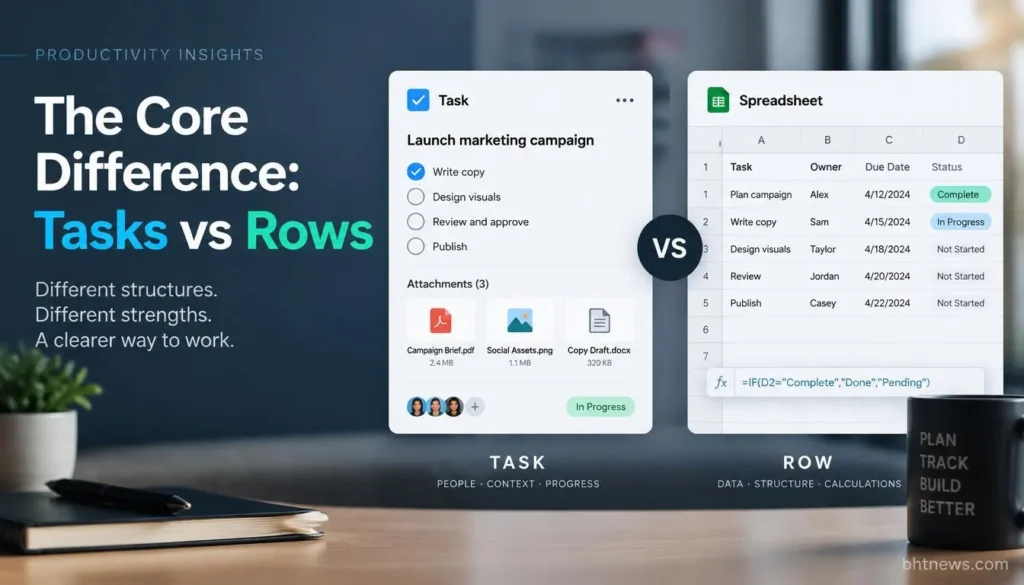
In Asana, a task is a rich object. It can carry files, custom fields, dependencies, comments and approvals, and it appears in List, Board, Timeline or Calendar views without losing context.
In Smartsheet, a task is a row in a grid. You can add many column types, formulas, and conditional rules, and then view the same rows as Gantt, Card, or Calendar.
5day.io puts the trade-off this way: rows give flexibility for data-heavy tracking, but feel like overhead for pure task coordination.
A hypothetical example. A marketing team launching a product tracks briefs, drafts, and approvals across a dozen people. That’s a task flow, and Asana fits.
The same company’s operations team tracks 400 equipment purchases with costs, vendors, delivery dates, and budget roll-ups.
That’s data with a few tasks attached, and Smartsheet fits. Many companies end up with both because different departments think differently.
Ease of Use and Learning Curve
Zapier’s reviewer, who says they tested both, found Asana easier. Asana has a Home tab and a My tasks list that act as a daily command center.
In Smartsheet, finding a project means opening Browse first, and Zapier says its Home screen is a search bar plus recent items.
Asana’s projects feel like hubs with overviews, goals, and status. Smartsheet’s feel more like a collection of files.
5day.io makes a similar point from the other side: Smartsheet rewards teams that invest in setting up automations and dashboards properly, and teams wanting plug-and-play often find the start daunting.
For Excel users, though, the grid needs almost no new mental model. If your team already lives in spreadsheets, the learning curve flips.
For other options in this category, see our guide to cloud-based project management software.
Reporting, Dashboards and Data Handling
This is Smartsheet’s clearest advantage, and both reviews agree. Smartsheet lets you write cross-sheet formulas, build IF-style logic, and create dashboards that pull from many sheets with charts and live metrics.
Zapier says Asana tracks status, assignees, and due dates but has no built-in calculation ability, so budget math needs another tool.
Asana’s dashboards cover project-level progress, completion rates, overdue tasks, and workload. 5day.io says deeper cross-portfolio analytics need the Advanced plan and, for anything beyond that, connections to Salesforce, Power BI or Tableau.
If you report to executives across a portfolio of projects every week, Smartsheet is the safer pick. If you need project status at a glance, Asana is enough.
Automation and AI
Smartsheet’s automation engine is built for complex logic: triggers from sheet changes, date conditions, or form submissions, with actions that can cascade across sheets.
Both reviews say Business plans include unlimited automations. Asana uses simpler rules and a visual workflow builder, and its AI can build a rule from a plain-English description.
Be careful with Asana’s automation numbers, because sources disagree. Zapier and 5day.io say 250 automations a month on the entry plan and 25,000 on Advanced.
Asana’s own pricing page, as read for this article, shows unlimited rules on Starter and above, and a third-party page lists per-project rule caps. If automation volume matters to you, get the current limit in writing from Asana.
On AI, Zapier and 5day.io both say Smartsheet AI is limited to Enterprise plans, while Asana includes AI Studio on paid plans.
Both pages were written before Smartsheet’s November 2025 announcements, which, per UC Today, added Smart Assist, Smart Flows, Smart Columns and Smart Agents, many of them in early access at launch. Treat the “Enterprise only” claim as dated.
On Asana’s side, AI Studio runs on credits: Asana’s pricing page lists 50,000 credits per account a month on Starter, 75,000 on Advanced and 200,000 on Enterprise, and 5day.io warns that AI rules can stop working when credits run out. That’s one competitor’s claim, but it’s worth asking Asana about.
Asana vs Smartsheet Cost
Reviews quote different numbers because they use different billing cycles. Zapier’s $12 for Smartsheet Pro and $13.49 for Asana Starter are monthly prices. 5day.io’s $9 and $10.99 are annual.
Here’s everything on one table, from Asana’s pricing page and a July 2026 third-party page for Smartsheet. I couldn’t open Smartsheet’s own pricing page, so confirm those figures there.
| Plan | Annual | Monthly | Notes |
| Asana Personal | $0 | $0 | Two collaborators per project and team |
| Asana Starter | $10.99 | $13.49 | Unlimited members |
| Asana Advanced | $24.99 | $30.49 | Portfolios, goals, more AI credits |
| Smartsheet Pro | $9 | $12 | 1 to 10 members; viewers free |
| Smartsheet Business | $19 | $24 | 3-seat minimum; unlimited automations |
| Enterprise (both) | Custom | Custom | Quote from sales |
What 10 and 50 People Pay
Hypothetical teams where everyone edits, annual billing, list prices, no add-ons or extra AI credits. It’s an illustration, not a quote.
| Setup | Arithmetic | Total |
| 10 people, Asana Starter | 10 x $10.99 | $109.90 a month |
| 10 people, Asana Advanced | 10 x $24.99 | $249.90 a month |
| 10 people, Smartsheet Pro | 10 x $9 (maximum 10 members) | $90 a month |
| 10 people, Smartsheet Business | 10 x $19 | $190 a month |
| 50 people, Asana Starter | 50 x $10.99 x 12 | $6,594 a year |
| 50 people, Asana Advanced | 50 x $24.99 x 12 | $14,994 a year |
| 50 people, Smartsheet Business | 50 x $19 x 12 | $11,400 a year |
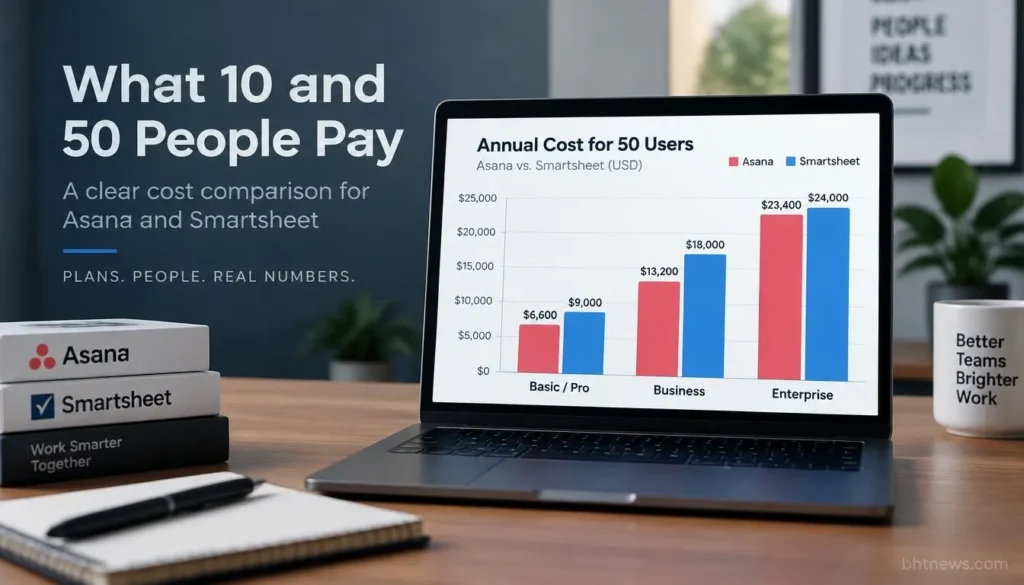
Two things shift these totals. Smartsheet’s viewers are free, so a team where many people only read can pay for far fewer seats. And 5day.io warns that Smartsheet’s Salesforce connectors, Tableau links, and resource tools can sit behind Advanced bundles priced separately, which these figures leave out.
Asana’s jump from Starter to Advanced is a 127% per-seat increase, which is why the plan you need matters more than the headline price.
The Free Plan Question
Zapier says Asana’s free plan supports up to 10 users. That’s out of date. Asana’s pricing page now says the free Personal plan allows two collaborators per project and team, and 5day.io agrees.
A forum post dated October 13, 2026 claims Asana emailed a nonprofit board that its older 10-user allowance would end on October 15.
The post shows no email and no Asana reply, so I can’t confirm it. If you rely on an older free workspace, check your account notices.
Smartsheet has no free plan for new users, per both Zapier and 5day.io, which offer a 30-day trial. A third-party page says a legacy free plan is closed to new sign-ups, while another lists a free tier with two sheets, so check which applies to you.
Does Asana Work With Smartsheet?
Yes, but not as a built-in two-way sync. Unito, a company that sells a sync product, says neither tool can do two-way sync on its own.
The usual routes:
- Zapier or Make: one-way triggers, such as creating a Smartsheet row when a new Asana task appears. Zapier’s page lists these workflows.
- Unito: two-way sync of Smartsheet rows with Asana tasks, with field mapping. Advanced sync features are only on select Enterprise plans, per Unito.
- Manual exports, which is fine for a monthly report but not for live work.
A common pattern: the project team works in Asana, and a reporting sheet in Smartsheet pulls the data for finance or executives. If you do this, decide which tool owns each field, so updates don’t conflict.
Downsides of Each Tool
Smartsheet
- Steeper learning curve and real setup time, per both reviews.
- Pro caps at 10 members, and Business needs at least three seats.
- AI features were limited to Enterprise as of the two reviews, and newer features were in early access.
- Some connectors and analytics sit behind separately priced Advance bundles.
- Not designed for fast, iterative creative work, per 5day.io.
Asana
- The free plan is now narrow.
- Weak built-in calculation and deeper analytics need Advanced or integrations.
- Per-seat cost climbs at scale, especially on Advanced.
- 5day.io, a competitor, reports user complaints about notification overload and clutter as projects multiply. I saw no independent data on how common that is.
- AI credit limits can affect AI-built automations, so monitor usage.
Ownership and Direction
Smartsheet was taken private by funds managed by Blackstone and Vista Equity Partners in a deal of about $8.4 billion, reported to be complete in January 2025. The buyers said they would invest to expand its collaborative work management products.
On Asana’s side, UC Today reports that co-founder Dustin Moskovitz stepped down as CEO and Dan Rogers took over on July 21, 2025, with Moskovitz staying as board chair.
Neither change shows a product problem. But if you’re signing a multi-year contract, ask about price lock terms and support commitments, since owners and strategies can change prices and packaging.
Alternatives Worth a Look
- monday.com: often compared with both tools in searches such as “Smartsheet vs monday,” though this article doesn’t compare it in detail.
- Jira: built for software teams and issue tracking, not general project coordination.
- Airtable: a database-style tool, which our Airtable vs Notion article covers once it’s live.
- 5day.io: pitched by its own site as a fit for marketing agencies. Treat that as a vendor claim.
If you’re weighing how AI features should factor into the choice, our piece on AI implementation in business covers the rollout side.
How to Decide in Five Questions

- Is your work mostly tasks or mostly data? Tasks and approvals point to Asana. Budgets, plans, and roll-ups point to Smartsheet.
- Does your team already live in Excel? If so, Smartsheet’s grid will feel natural. If not, expect training.
- Who needs reports? Executive cross-project dashboards favor Smartsheet; project-level status is enough in Asana.
- How many people edit and how many only view? Smartsheet’s free viewers can lower the bill; Asana charges per member.
- How much AI do you need and at what budget? Compare the credit limits in writing before you commit.
Then run a two-week pilot. Build one real project in each tool, with the people who’ll actually use it, and see which one the team opens without being reminded.
Conclusion
If your team’s work is tasks, pick Asana. If it’s data and reporting, pick Smartsheet. If you can’t tell, the pilot will settle it faster than any comparison. Check the automation and AI limits in writing, and ask about price terms before a long contract.
Your next step: build one real project in each tool with your team for two weeks and compare. For more software guides, browse BHTNews.
General information only. Prices and features change often, so confirm each figure on the vendor’s page before you buy.
Frequently Asked Questions (FAQ)
Is Asana better than Smartsheet?
Neither is better across the board. Asana is easier to adopt and better for task coordination, while Smartsheet is stronger for formulas, cross-project reporting, and spreadsheet-style planning. Pick based on how your team works.
Does Asana work with Smartsheet?
Yes, through Zapier, Make, or a sync tool such as Unito, but there is no built-in two-way sync. Zapier-style connections are usually one-way triggers, while Unito says it syncs both ways. Test the sync on a small project first.
What are the downsides of using Smartsheet?
The learning curve is steeper, setup takes time, and Pro is limited to 10 members. Some analytics and connectors may need separately priced Advanced add-ons, and AI features were Enterprise-only in the reviews read here.
What is a good replacement for Smartsheet?
It depends on what you use it for. Asana suits task coordination, monday.com is often compared as a visual alternative, and Jira suits software teams. Check which Smartsheet features you rely on before switching.
Does Asana have a free plan?
Yes. Asana’s pricing page lists a free Personal plan limited to two collaborators per project and team. Older articles claim 10 users, which is out of date.
Does Smartsheet have a free plan?
Not for new users. Zapier and 5day.io both say there is only a 30-day trial. One third-party page says a legacy free plan is closed to new sign-ups.
Which is cheaper, Asana or Smartsheet?
Smartsheet is cheaper per seat at entry level: $9 for Pro against $10.99 for Asana Starter on annual billing. At 50 people, Smartsheet Business at $19 comes to about $11,400 a year, against $6,594 for Asana Starter and $14,994 for Advanced. Confirm current prices with each vendor.